
How to Add Country of Origin to Shopify Products in Bulk
To add country of origin to Shopify products in bulk, you have three options: Shopify’s built-in bulk editor, the inventory CSV import, or a bulk-editing app. Since duties on US-bound shipments are now calculated for every order — and the EU follows from July 1, 2026 — country of origin has gone from an optional field to one Shopify advises every international seller to fill in on all products.
Here’s what the field actually means, why it matters as much as your HS codes, and the fastest way to set it across a full catalog.
This is general information, not legal or customs advice.
What does “country of origin” actually mean?
Country of origin (COO) is where a product was created or assembled into the form in which you sell it — not where you ship it from, and not where your business is registered.
Shopify’s own example: a table made from materials sourced in several countries but assembled in the United States has a US country of origin. The same logic applies in reverse — a T-shirt sewn in Bangladesh, stored in a Canadian warehouse, and sold by a US-registered store still originates in Bangladesh.
If you dropship, the origin is wherever your supplier manufactures the product. Your supplier or manufacturer can confirm it; for most catalog products it’s printed on the item or its packaging.
Why does country of origin matter now?
Because tariffs are applied by origin, not by seller location — and with de minimis gone, tariffs now touch every US-bound shipment.
Per Shopify’s guidance, whether a tariff applies to your shipment is determined by the product being imported and its country or region of origin, not where you operate from. Duty rates for the same product can differ sharply depending on origin: goods covered by trade agreements like USMCA may qualify for preferential rates, while goods from other origins can carry steep tariffs.
Missing origin data causes the same problems as missing HS codes: inaccurate duty estimates at checkout, surprise charges for your customer at delivery, and parcels flagged or held at the border. Customs declarations ask for both fields together — they’re a pair, and you should fill them in the same pass. (For the HS code half, see How to Bulk Add HS Codes to Shopify Products.)
Method 1: Shopify’s built-in bulk editor
Best for: small batches of products that share the same origin.
- From your Shopify admin, go to Products.
- Check the products you want to edit.
- Click Bulk edit.
- Click Columns, and under Shipping, add Country of origin (add Harmonized System code too — same pass, both fields).
- Select the origin for each row and click Save.
The limits: selection is manual, page by page, with limited filtering. There’s no “everything from this vendor” shortcut, no record of what you changed, and on a 2,000-product catalog it turns into an afternoon of checkbox clicking.
Method 2: Inventory CSV export/import
Best for: one-time, full-catalog cleanups by merchants comfortable in spreadsheets.
Country of origin isn’t in the standard product CSV — it lives in Shopify’s inventory CSV, in the COO column:
- Go to Products > Inventory, click Export (choose All states for overwrite protection).
- Open the file and find the COO column (and HS Code next to it).
- Enter origins as two-letter ISO country codes — CN for China, IN for India, BD for Bangladesh, US for the United States. Full names won’t work.
- Leave On hand (new) empty so stock levels don’t change.
- Re-import via Products > Inventory > Import and review the validation summary.
The limits: it’s an export-edit-import round-trip with a validation email to check and failed rows to fix. The same file controls inventory quantities, so a stray value in the wrong column can overwrite stock. And the work repeats every time you add new products.
Method 3: A bulk-editing app (fastest for full catalogs)
Best for: large catalogs, mixed-origin catalogs organized by vendor or collection, and stores that add products regularly.
Origin usually follows your sourcing: everything from one vendor is made in one country, everything in a collection comes from the same supplier. HS Code & Origin Bulk Editor is built around exactly that pattern — filter your catalog by vendor, collection, or product type, set the country of origin (and HS code) for the group, and apply. It runs directly in the Shopify admin with no CSV export-import cycle and no per-product clicking.
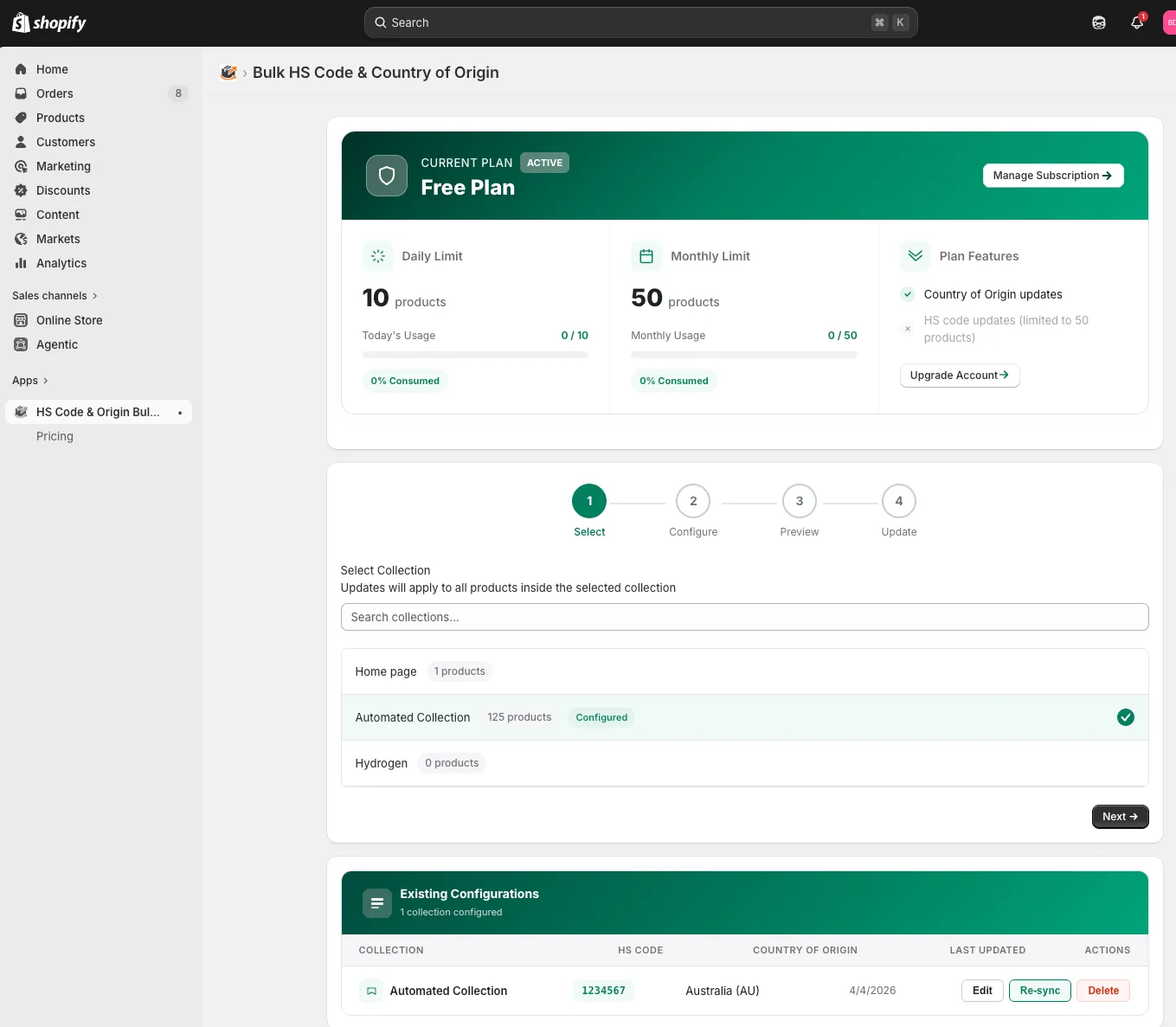
Paid tiers add update history, scheduled automatic updates, custom origin rules, and batch updates across multiple collections — useful when sourcing changes and your origin data has to keep up.
The honest trade-off: small catalogs don’t need an app. But setting origin across a thousand products by vendor takes minutes this way, versus hours by checkbox or spreadsheet.
Which method should you use?
Match the method to your catalog size and how often products change.
- Under ~50 products: built-in bulk editor. Free and tolerable.
- A few hundred, one-time fix: inventory CSV — careful with the stock columns.
- Hundreds to thousands, or a growing catalog: doing this by hand takes hours and has to be redone with every new product batch. HS Code & Origin Bulk Editor sets origin by vendor or collection in a few clicks.
Whichever you choose, set HS codes in the same pass — duties are calculated from both fields together, and every method here exposes both columns side by side. For the complete compliance picture, see our full guide: HS Codes & Country of Origin for Shopify: The Complete 2026 Compliance Guide.
FAQ
What is the country of origin for a Shopify product?
It’s the country where the product was created or assembled into the form you sell it in — not your business location or warehouse location. A product manufactured in Vietnam and fulfilled from a US warehouse has Vietnam as its country of origin.
How do I add country of origin to all Shopify products at once?
Three ways: Shopify’s bulk editor (select products → Bulk edit → add the Country of origin column), the inventory CSV (fill the COO column with ISO codes and re-import), or a bulk-editing app like HS Code & Origin Bulk Editor, which applies origin by vendor, collection, or product type without a CSV round-trip.
What format does Shopify use for country of origin in CSV files?
Two-letter ISO 3166-1 alpha-2 codes: CN for China, IN for India, US for the United States, BD for Bangladesh. Full country names won’t import. The column is named COO in the inventory CSV.
What’s the country of origin for dropshipping products?
The country where your supplier manufactures the product — typically China for AliExpress-style suppliers. It is not your business registration country. Tariffs on your US-bound orders are determined by that manufacturing origin.
Does country of origin affect how much duty my customers pay?
Yes, directly. Duty rates depend on the product (HS code) and its origin; the same product can carry different rates from different origins, and trade agreements like USMCA can reduce duties for qualifying origins with proper documentation.
What happens if country of origin is missing on my products?
Duty estimates at checkout become inaccurate or unavailable, customs declarations are incomplete, and parcels can be delayed or held at the border. Shopify advises adding both country of origin and HS codes to all products if you ship internationally.
This is general information, not legal or customs advice. Customs rules change — verify current requirements with official sources or a licensed customs broker.
 Sharfaraz Ahmed


